What happens when you change your VPN location?


When you use ExpressVPN to change your VPN location, your internet traffic is routed through a VPN server in the location you select. This changes the location that websites and services can infer from your IP address, which can affect the content they show you. However, it doesn’t change other location signals your device may share, such as GPS data.
What happens when you switch your ExpressVPN location?
The main change when you switch your VPN location is your public IP address. When you connect to an ExpressVPN server, websites and online services see the VPN server’s IP address instead of your own. Because IP addresses are associated with geographic locations, this also changes your IP-based location. For example, if you switch from a VPN server in the U.S. to one in Germany, your visible IP address changes to one associated with the German server.
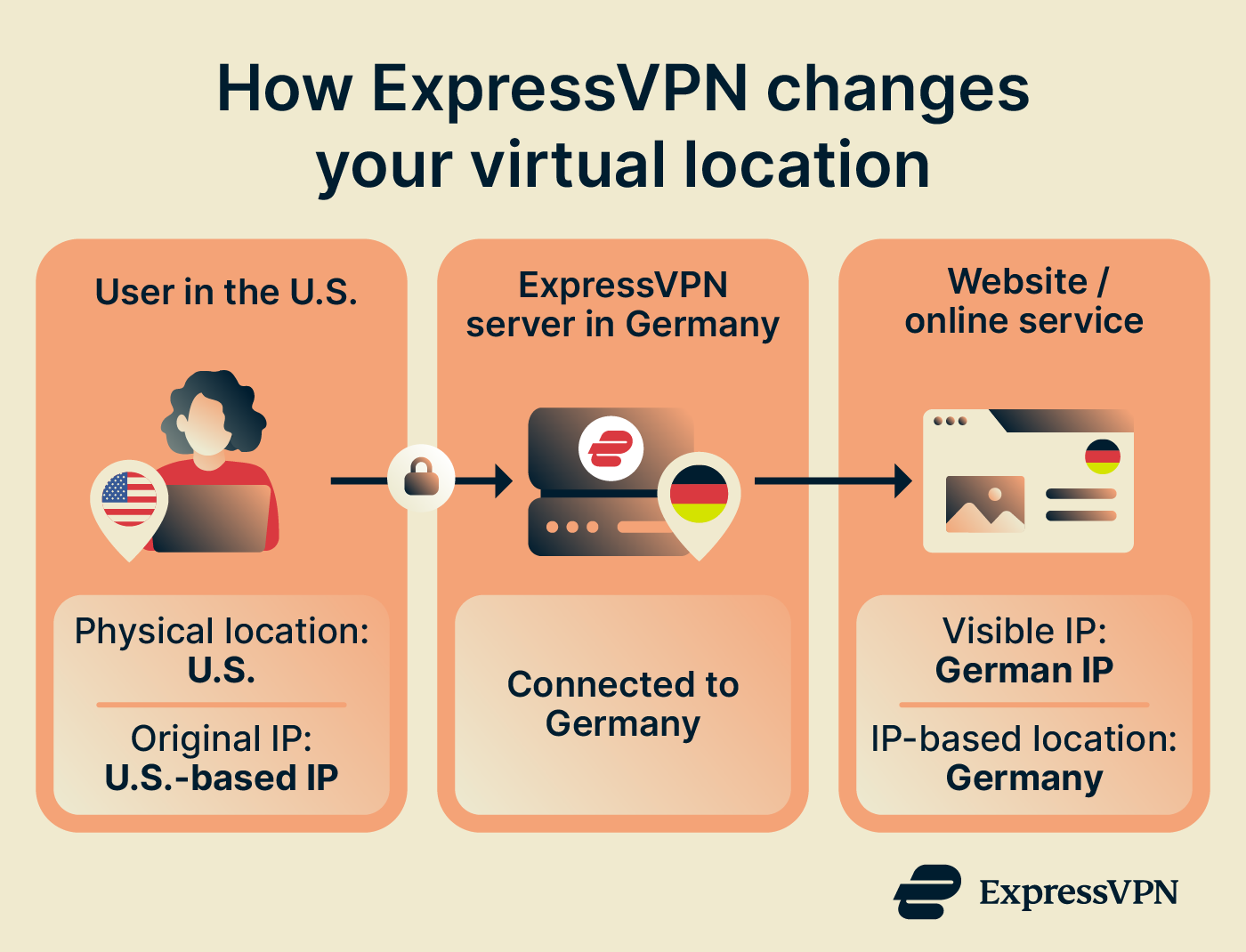
This change only applies to your public IP address and IP-based location. It doesn't automatically change other ways a website or app may determine your location.
For example, apps or websites that have permission to access your device’s precise location may still know where you actually are. Logged-in accounts, cookies, billing information, and other data can also provide services with additional clues about your location.
| Location signal | Does changing ExpressVPN location change it? |
| Public IP address | Yes |
| IP-based location | Yes |
| GPS/device location | No |
| Browser/device location permissions | No |
| Account country / region settings | No |
| Time zone | No |
Why should I change my virtual location with ExpressVPN?
Depending on what you’re doing online, using ExpressVPN to switch virtual locations can be useful for a few practical reasons:
- Reduce what your IP address reveals about you: Beyond masking your regular IP address, ExpressVPN doesn’t log your browsing activity, Domain Name System (DNS) queries, or connection logs that could associate your activity with your IP address.
- Keep your online experience familiar while traveling: When you’re abroad, you can connect to an ExpressVPN server in your home country for a more familiar online experience. This is especially useful when websites use your IP location to determine language, currency, or regional content. ExpressVPN has 214 server locations across 113 countries, giving you a wide range of locations to choose from when you’re away from home.
- See how websites and services appear in other locations: If you develop, manage, or troubleshoot websites, ExpressVPN’s range of server locations makes it easy to see how a site or service appears from different IP-based locations. This can be useful when checking localized search results, regional storefronts, currencies, advertisements, or other location-specific content.
Quick guide: How to change your VPN location with ExpressVPN
-
Open ExpressVPN and choose the VPN server location you want to use. You can also use ExpressVPN’s Smart Location feature to find the best VPN location for you based on factors such as download speed, latency, and distance.
-
Connect to that location.
For device-specific steps, see ExpressVPN’s guide to changing VPN server locations.
Why does a website or app still show a different location?
If a website or app shows your physical location, a previous location, or somewhere other than the ExpressVPN location you selected, it might be using other information to determine or display your location. Here are some reasons this might happen:
The site or app is using device location
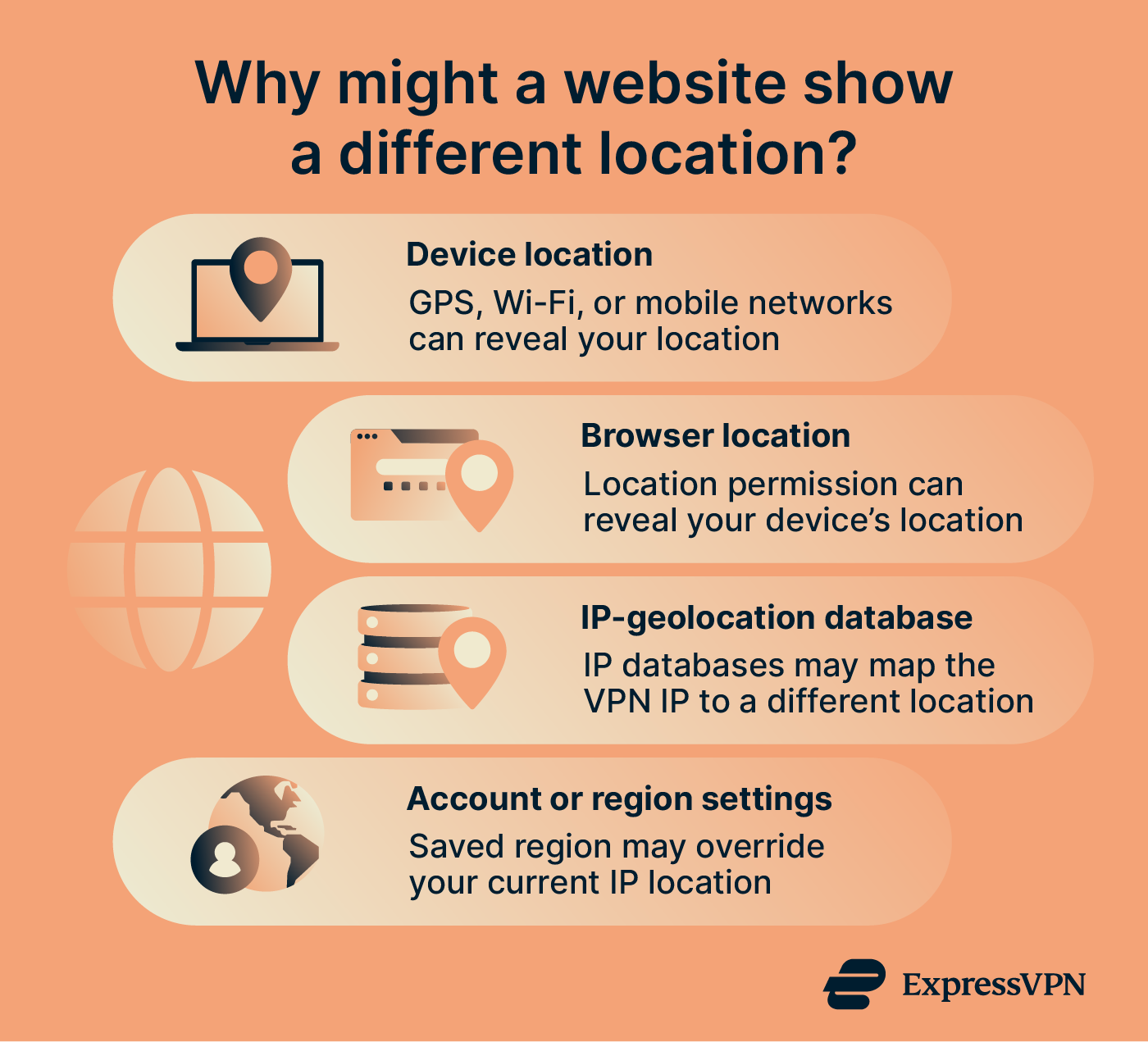
Changing your ExpressVPN location doesn’t change your device’s physical location. If an app or website has access to device location services, it may use signals such as GPS, nearby Wi-Fi networks, Bluetooth, or mobile networks to determine your device's location. That location can therefore differ from the location associated with your ExpressVPN IP address.
Your browser is sharing your location
Connecting to an ExpressVPN server in another location doesn’t automatically change the location information your browser provides to websites. If you’ve given a website permission to access your browser’s geolocation, it might determine your location using device-level signals rather than the IP address ExpressVPN provides.
That said, the ExpressVPN browser extension includes a Spoof your location feature that prevents HTML5 geolocation from revealing your physical location on most websites when you’re connected to ExpressVPN.
The service is using saved account or region information
Changing your ExpressVPN location doesn’t change the country or region stored in your online accounts. A service that checks the information saved to your account might continue showing the location associated with your account settings, even though it sees an ExpressVPN IP address associated with another location.
The website uses a different IP-geolocation database
Even when ExpressVPN has changed your public IP address, websites might still disagree about where that VPN IP is located. Different websites and services rely on different IP-geolocation databases, and those databases don’t always map an IP address to the same location.
So, if one website shows an unexpected location for your ExpressVPN IP, that doesn’t necessarily mean your ISP-assigned IP address or physical location has been exposed.
How to check your VPN location
You can check your VPN location by using the ExpressVPN IP Address Checker. While connected to ExpressVPN, it shows your current public IP address and IP-based location, so you can confirm that your regular IP address is hidden and your selected VPN location is showing as expected.
Keep in mind that the IP Address Checker only shows the public IP address and IP-based location that websites can see. It doesn’t mean your GPS or device location, browser location permissions, or account country or region settings have changed.
If the checker still shows your normal public IP address, see ExpressVPN’s troubleshooting guides to identify the issue and find the appropriate steps to resolve it.
Want to change how websites see your location?
ExpressVPN lets you switch between VPN server locations around the world, changing your public IP address and IP-based location while keeping your internet traffic encrypted.
Change your virtual location with ExpressVPN
Try ExpressVPN with a 30-day money-back guarantee for new users.
FAQ
Does ExpressVPN change my GPS location?
Why does Google or another website still know my location when I’m using a VPN?
How often does ExpressVPN change my IP address?
If you need an IP address that stays the same, ExpressVPN also offers a Dedicated IP, which provides a static IP assigned exclusively to you.